95 verified capabilities

Four modes.One control.

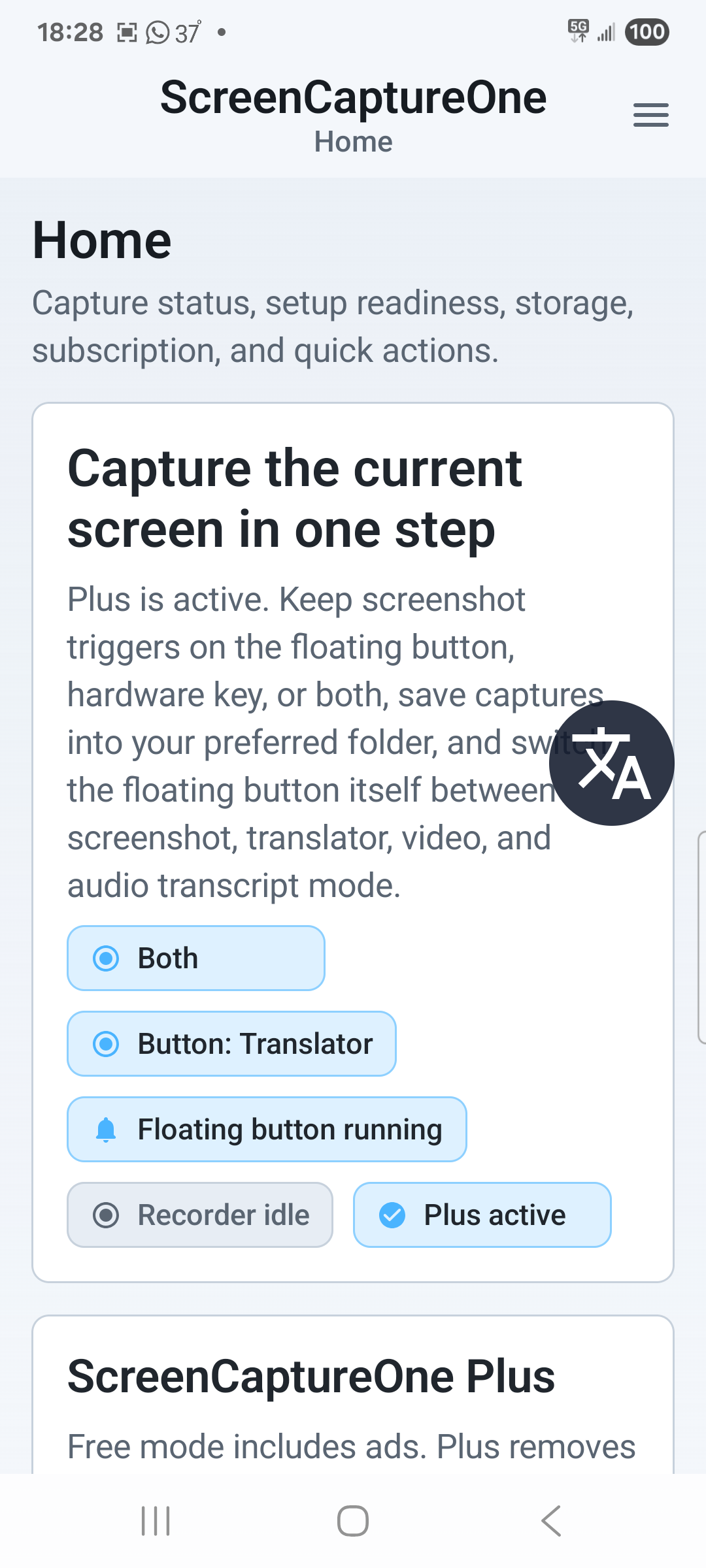
Screenshot, translate, record, or transcribe audio without leaving the conversation or content in front of you.

Translator mode: Home status.
95
Public capabilities
4
Capture modes
Free + Plus
One app, room to grow


COMPLETE CAPABILITY MAP

Find the feature your capture needs next.

AvailabilityPlus includes Free; Plus additions are listed separately.
14 systems / 95 capabilities shown
01
Screenshot7 capabilities

Four-mode capture control

Keep every capture workflow one tap away with a movable control and a matching Android shortcut.

Explore all 7 capabilities
  • Draggable floating capture buttonFree
  • Quick Settings tile that follows the active mode and can stop recordingFree
  • Screenshot and Video recording modesFree
  • Light, Dark, or Follow phone themeFree
  • Translator and Audio transcript modesPlus
  • Volume Down capture that follows the active modePlus
  • Combined floating-button and hardware-key trigger modePlus
02
Screenshot3 capabilities

Screenshot capture

Capture the visible screen instantly or continue through a compatible long page or chat.

Explore all 3 capabilities
  • Standard screenshot capture through Android AccessibilityFree
  • Scrolling screenshots for compatible long pages, feeds, and chatsPlus
  • Automatic fallback to a standard screenshot when Android cannot keep scrollingPlus
03
Screenshot7 capabilities

Editor and on-device OCR

Open a saved screenshot, mark it up, copy it, or extract useful text without uploading the image.

Explore all 7 capabilities
  • After-screenshot actions: Open, Edit, Copy, Share, Delete, and RecentPlus
  • Arrow, rectangle, text, and freehand annotation toolsPlus
  • Pinch zoom, drag-to-pan, and navigation mapPlus
  • Copy Annotated and Export actionsPlus
  • On-device OCR for saved screenshotsPlus
  • Copy all text plus detected phone, email, and link actionsPlus
  • Optional automatic OCR clipboard copy after savePlus
04
Translator7 capabilities

One-tap Translator

Capture on-screen text, translate it, copy it, and open the complete result in one dedicated mode.

Explore all 7 capabilities
  • Dedicated Translator mode from the floating button or Quick Settings tilePlus
  • Immediate capture, OCR, translation, clipboard copy, and reader openingPlus
  • On-device OCR before any provider requestPlus
  • Text-only translation request; the screenshot image is not uploadedPlus
  • Target-language list that defaults to the phone languagePlus
  • Optional preservation of sender names, timestamps, and detected metadataPlus
  • Scrolling capture before OCR on compatible long pagesPlus
05
Translator6 capabilities

Translation reader and replies

Read the full translation, recover from errors, and prepare a reply for the original conversation.

Explore all 6 capabilities
  • Full scrollable reader with translated and original OCR textPlus
  • In-place retry after OCR or provider failuresPlus
  • Automatic clipboard copy for translated outputPlus
  • Reply composer inside the translation readerPlus
  • Reverse translation into the original screenshot languagePlus
  • Automatic reply copy plus a dedicated Copy reply actionPlus
06
Video5 capabilities

Screen recording

Start a dependable Android screen recording and keep its essential controls close while it runs.

Explore all 5 capabilities
  • Recording through Android screen-share consentFree
  • Default 1080p, Balanced, 30 fps profile with microphone audioFree
  • Notification controls for Pause, Resume, and StopFree
  • Quick Settings tile starts recording and changes to Stop recordingFree
  • Floating control hides during full-screen recordingFree
07
Video5 capabilities

Video quality and audio

Choose the resolution, file size, smoothness, and sound source that fit the recording.

Explore all 5 capabilities
  • 720p or 1080p resolutionPlus
  • Smaller files, Balanced, or Higher quality bitrate presetsPlus
  • 24, 30, or 60 fps frame-rate presetsPlus
  • Microphone, Internal audio, or Silent recordingPlus
  • Internal playback capture in compatible appsPlus
08
Audio transcript8 capabilities

One-tap Audio transcript

Play a voice message and let the dedicated waveform mode stop, transcribe, and open the result.

Explore all 8 capabilities
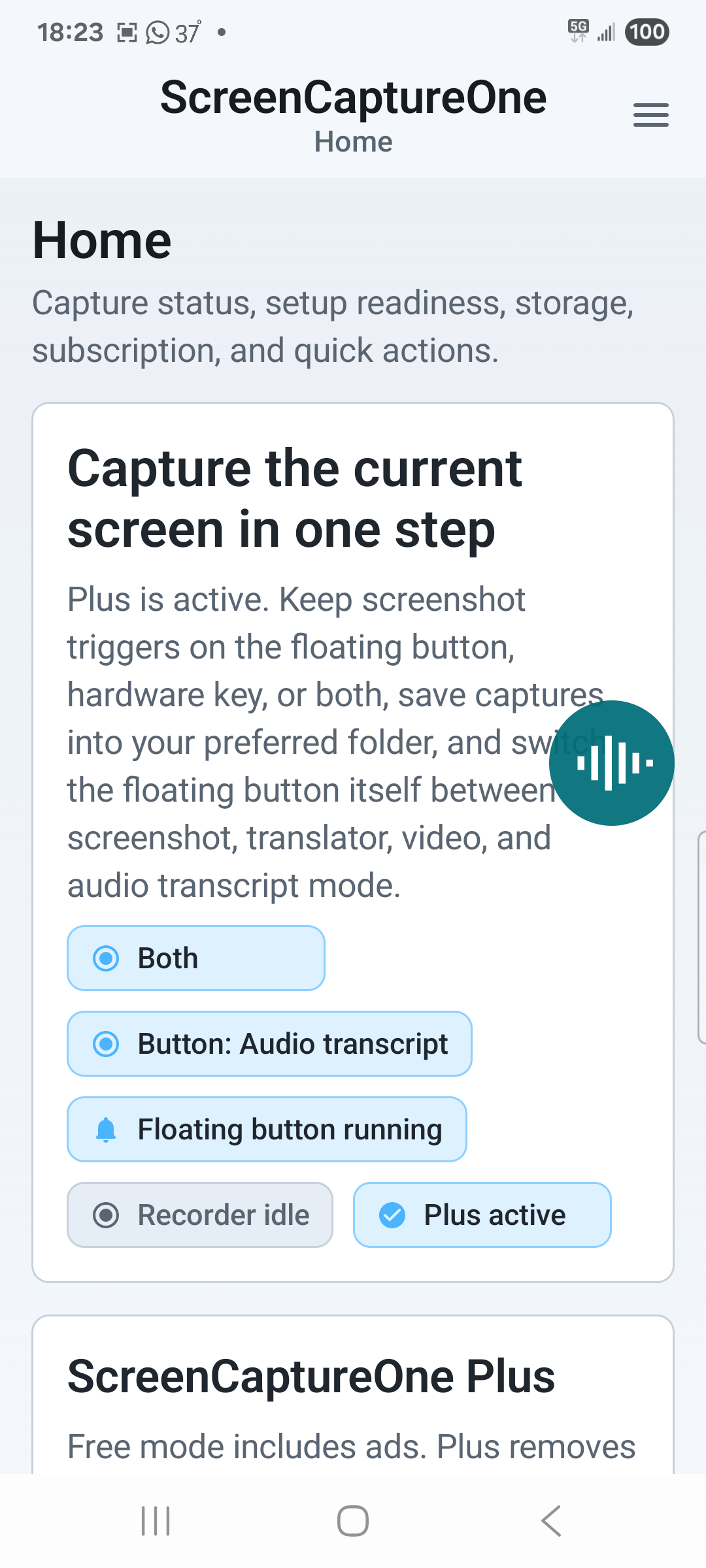
  • Dedicated Audio transcript mode with a teal waveform controlPlus
  • One-tap flow tuned for chat voice messages and short audio clipsPlus
  • Forced internal-audio capture without changing the saved video profilePlus
  • Silence-aware automatic stop after audible playback endsPlus
  • Immediate transcription after recording stopsPlus
  • Visible, cancelable progress during extraction and provider processingPlus
  • Audio-only extraction; the saved screen video is not uploadedPlus
  • Silent-audio detection before a provider requestPlus
09
Audio transcript9 capabilities

Transcript reader and controls

Control language and transcript detail, then keep the finished result ready to read or paste.

Explore all 9 capabilities
  • Optional transcript translation, enabled by defaultPlus
  • Target-language list that defaults to the phone languagePlus
  • Spoken-language selection with Auto-detectPlus
  • Automatic clipboard copy for the finished resultPlus
  • Full scrollable reader with translation first and original transcript belowPlus
  • Optional timestamps and speaker labelsPlus
  • App-private transcript saved with its recordingPlus
  • Transcribe again for existing saved recordingsPlus
  • Transcript actions from after-save sheets and RecentPlus
10
Privacy + AI8 capabilities

AI provider setup

Configure translation and transcription providers with tested credentials and discoverable models.

Explore all 8 capabilities
  • Translation through OpenAI, Ollama Cloud, Grok, or GeminiPlus
  • Transcription through OpenAI, Grok, or GeminiPlus
  • Test API key validationPlus
  • Masked API-key entry with encrypted device-only storagePlus
  • Dynamic model discovery after validationPlus
  • Separate translation and transcription model selectorsPlus
  • Transcription-readiness feedback for provider modelsPlus
  • Per-provider HTTPS endpoint controls with credential-safe URL validationPlus
11
Library5 capabilities

Saved-capture actions

Use the right next action for a screenshot or recording without rebuilding the workflow.

Explore all 5 capabilities
  • Saved-capture action sheets for screenshots and recordingsPlus
  • Screenshot actions: Open, Edit, Copy, Share, Delete, and RecentPlus
  • Recording actions: Open, Trim, Transcript, Share, Delete, and RecentPlus
  • Trim handoff to a compatible Android video editorPlus
  • Favorite destinations moved to the front of share rowsPlus
12
Library6 capabilities

Files and storage

Know where captures live, monitor free space, and control naming and retention.

Explore all 6 capabilities
  • Home summary with output folder, free space, and last saved captureFree
  • Default save location in Pictures/ScreenCaptureOneFree
  • Configurable Recent retention limit with 30 as the defaultFree
  • Optional deletion of overflow captures from storageFree
  • Custom output directoryPlus
  • Custom file names with automatic numbering or ask-before-save promptsPlus
13
Library8 capabilities

Recent, collections, and sharing

Find, group, clean up, and share a growing library of screenshots and recordings.

Explore all 8 capabilities
  • All, Screenshots, and Videos filtersPlus
  • Filename search with Newest or Oldest sortingPlus
  • Reverse-time grid that follows the configured retention limitPlus
  • Collections for labeling and filtering related capturesPlus
  • Bulk delete with confirmation and storage cleanupPlus
  • Multi-select sharing from RecentPlus
  • WhatsApp, Viber, email, SMS, and Android share targetsPlus
  • Favorite share-target orderingPlus
14
Privacy + AI11 capabilities

Privacy and local-first handling

Keep captures local and make each remote-processing boundary explicit and limited.

Explore all 11 capabilities
  • Screenshot and recording files remain on the device unless sharedFree
  • Screenshot OCR runs locally on-devicePlus
  • Translator uploads extracted text only, never the screenshot imagePlus
  • Reply translation uploads drafted text plus original OCR context onlyPlus
  • Audio transcript uploads extracted audio only, never the screen videoPlus
  • Translated transcript requests send recognized text onlyPlus
  • Separate first-use disclosures before translator text or transcript audio is uploadedPlus
  • Encrypted provider credentials stay on-device with cloud backup disabledPlus
  • Sensitive clipboard marking for OCR, translations, transcripts, replies, and imagesPlus
  • Private recording and transcription notifications on the lock screenPlus
  • Ad-free experience with ScreenCaptureOne PlusPlus


FREE TO START. PLUS FOR ALL FOUR MODES.

Put all four modes within reach.

Start free with screenshots and video. Plus adds Translator, Audio transcript, scrolling capture, editing, OCR, advanced controls, and the complete library.

FREEScreenshot + videoFloating control, Quick Settings, recording controls, storage, and retention.
PLUSAll four modesTranslator, audio transcript, scrolling, editing, OCR, AI setup, library, and no ads.
Audio transcript mode: Home status.